
Project Management Solutions

Overview
Synergy Project Management Solution (PMS) is designed for constant development, as with every new project, you handle a new team and a new set of stakeholders. For instance, it pays to understand how to deal with tough stakeholders since whether you work on projects or not, you will always encounter such people in your line of business. Project Management provides structure and control of the project environment so that the agreed activity will produce the right products or services to meet the customer’s expectations.
Synergy’s Project management solution helps every business to plan and manage the project successfully and complete its listed goals and deliverables. It involves identifying and managing risk, careful resource management, smart budgeting, and clear communication across multiple teams and stakeholders.
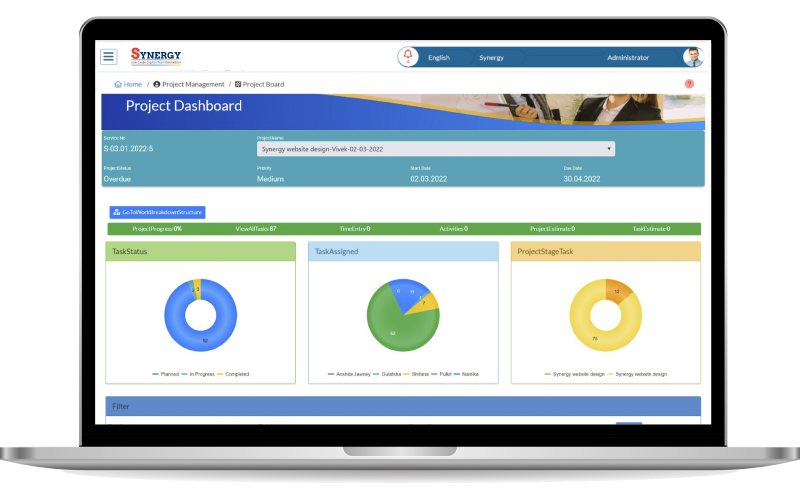
Project management solution modules are
- Project timeline management:
The user can view the project timeline on the Daily, weekly and monthly basis. - Project planning management:
The user can plan the project on a daily, weekly and monthly basis. User also can view the project status, start date, end date, priority and project name. - Project task management:
The user can view filter, draft task, cancel task, complete task, overdue task and in progress task. - Project team workload management:
The user will be able to create the task and sub task, user can view the task details like description, predecessor, and sub task. User can also reject the task, share the task to another user and team. - Note management:
The user view the note, export to excel, search the note on the basis of note, description, and category level. - Time entries management:
The user will be able to add the time entries, user can view the list of the time entries, user can create work time of task which include start date, end date, service, task, duration and work comment. - Project template management:
The user can search and the project template. - Work breakdown structure (WBS) management:
User will be able to view the WBS tree, WBS timeline, WBS diagram. User can filter the work on the basis of the assignee, task group, start date and end date. - Project timeline drag management:
The user will be able to add the project and give the timeline to the particular project. - Comprehensive search:
Metadata is used to quickly locate the information. - Security and privacy:
PMS enterprise‐class architecture maintains the confidentiality of user and corporate data by encrypting data at motion and at rest. - Permissions:
Users can modify sharing permission settings through an easy‐to‐understand graphical user interface, while enterprise administrators can implement permissions throughout an organization with the administration module. - Project reports management:
User can view all the report related to this system like created vs resolved task, pie chart report, average age report, resolution time report, resource allocation report, time since task report, pending task report, resource utilization report, weekly usages report, hour spent report.
Benefits of Project Management Solution
- Budget Management:
Budget is the most important item to manage the project. It helps to manage the budget from the initial requirement of the work to final delivery of the project. - Accountability and Transparency:
It offers the transparency between stakeholder and team; both can check the progress of the work. - File sharing:
It has the features to share and download files safely. - Increased productivity:
It helps to increase the productivity to make the right decision on the project. - Project planning and scheduling:
This system gives the systematic approach to project planning that enables you achieved the goals of your project. - Monitoring timeline:
For the specific task project has deadline, so with the help of this project management system, we can easily track the project progress.